Why Your AI Game Has No Clear Direction and How to Fix It
You describe your game idea to an AI game generating platform and hit play. Your character moves, objects pop up, but after a minute you wonder what you are even supposed to do. No clear goal. No progress. No reason to continue. Players mirror this, they wander for 20 to 30 seconds, get bored, and leave.
A game with good direction tells players exactly what to do, why it matters, and how close they are to succeeding. It creates a straight path from start to finish with small checkpoints along the way. The problem usually comes from vague or missing instructions in the initial description. This guide explains why direction gets lost so easily and gives you straightforward ways to add it back.
Why Players Lose Direction So Quickly
When a game starts without telling the player the main objective, they have to guess. Is the goal to collect everything? Survive as long as possible? Reach the other side? Without a clear answer, most people stop trying after a short time. Even if the controls work and the visuals look nice, no direction means no motivation.
Common reasons the direction disappears include no visible goal at the beginning, no score or timer or level counter on screen, no win or lose condition explained, progress that feels invisible with no bar or milestones, and instructions that are hidden or missing completely.
Players need to know what success looks like within the first 5 to 10 seconds. If they don’t, the game feels like wandering in fog.
Start with a Crystal Clear Objective
Every complete game needs one main goal that is simple and visible right away. The objective should fit in one short sentence and appear on the start screen.
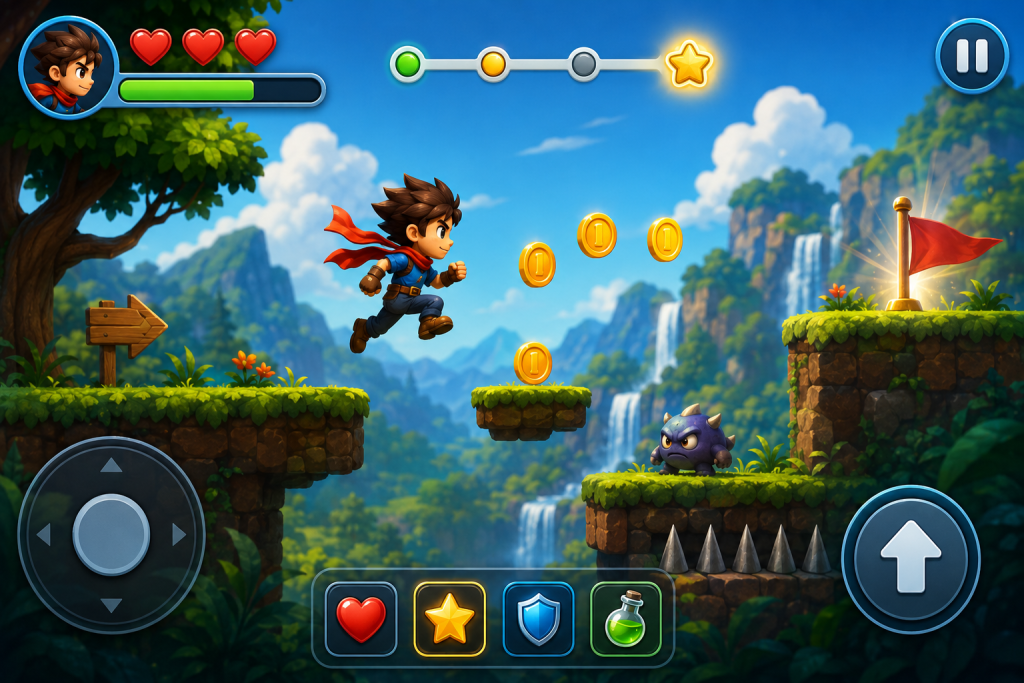
Show a large bold text at the top or center such as Reach the flag, Collect 50 coins, or Survive 60 seconds. Add a small tutorial line on the first screen like tap to jump over gaps and grab stars. Make the goal tied to the core action, so if the game is about jumping the goal is jump to the end, and if it’s shooting the goal is hit 20 targets. Keep it short term so players feel they can achieve it in 30 to 90 seconds on the first try.
Add to your description something like: start screen shows big text saying collect 30 coins to win with a progress counter at the top, and the first level is short and easy so players can reach the goal quickly.
Test by opening the game fresh. Do you know what to do in under 5 seconds? If yes, the start is strong.
Show Constant Progress on Screen
Once players know the goal, they need to see how close they are at all times. Invisible progress kills motivation faster than anything.
Place a live score, coin count, distance, or timer in the top corner where it’s always visible. Add a filling progress bar that grows as the player gets closer to the goal. Show milestone messages like 10 more coins to win or halfway there when the bar reaches 25, 50, and 75 percent. Highlight big steps so when the player collects the 10th coin a message flashes saying keep going with the remaining count and a short sound.
Describe it in your game setup as: always show the current coin count and progress bar at the top center, and every 10 coins display an encouraging message in bright text for 2 seconds. Players feel movement toward the finish line, and that feeling keeps them pushing forward.
Define Clear Win and Lose Conditions
A game without a defined end feels endless and pointless. Players need to know when they have won or lost so they can celebrate or learn and try again.
When the player collects the last coin or reaches the flag, show a big You Win screen with confetti, final score, and a Play Again button. If the player falls off the screen or gets hit three times, show Game Over with the score achieved, a short explanation of what went wrong, and an instant retry button. Keep retries quick with a restart in 1 to 2 seconds and no long loading or menus. Add optional high score tracking that saves the best score and shows it on the start screen so players want to beat it.
Clear endpoints give closure. Players finish a round feeling accomplished or motivated to improve, not confused about whether the game is over.
Add Gentle Guidance Without Overwhelming
Some games need a little help so players don’t get stuck, but too much guidance feels like hand holding.
On the first level only, show floating arrows or highlights pointing to the next collectible or safe path. Use one time tutorial popups like tap here to jump that appear once on the first play and never again. Show hints after repeated fails such as try jumping earlier to clear the gap, but only after 3 failures in the same spot. Keep it minimal with no permanent on screen arrows or text boxes that cover the view.
Guidance helps beginners without annoying experienced players. Test by playing as if you’ve never seen the game. Do you understand quickly without feeling babied?
Test Direction with Fresh Eyes
You know your goal, but new players don’t. Testing reveals confusion that you can’t see yourself.
Play the game blind after each change and pretend it’s your first time. Measure how long until you understand the goal and aim for under 10 seconds. Ask 2 to 3 friends what they are supposed to do and whether they ever felt lost. Watch whether most short sessions end with a win or a clear game over.
On platforms like Astrocade, you can edit the description and regenerate in seconds. Use that speed to test direction fixes fast. After 4 to 6 rounds, most games gain a strong, clear direction.
See It Done Right
Aquarium Merge is a great example of a game with clear and immediate direction, where the goal of merging sea creatures is obvious from the first second, progress is always visible on screen, and every merge delivers instant feedback that shows exactly how close you are to the next level. Notice how the objective stays front and center throughout, which is exactly what makes direction feel strong and keeps players engaged.
Make Direction Your First Priority
Clear direction is the foundation of every enjoyable game. Start with a visible goal, show constant progress, define win and lose conditions clearly, add light guidance, and test with fresh eyes. Write these elements directly into your game description so the tool builds them in from the start.
Open your current game description now, add one clear goal statement and a progress display, generate, and play to see if it feels more purposeful. Keep going one fix at a time. Soon your game will guide players naturally from start to satisfying finish.
Whether you are building your first project or refining an existing one, Astrocade lets you update, regenerate, and test in seconds so adding clear direction stays fast and simple.
